
Why IT security is a management responsibility
Monday morning at a small business: instead of the usual programs, every screen shows a ransom demand. The server and network drives are encrypted, and so is the USB drive attached to the server. The last usable backup is eight months old.
The question comes up quickly: Who is responsible for this? The answer is often uncomfortable – the managing director, personally. Data backup and IT security are not just a technical matter; under German law they are a duty of company management.
In this article, I explain when managing directors are liable, why this also affects medical practices and law firms, and what a simple, affordable backup solution looks like.
When is the managing director liable?
In short: when they fail to ensure adequate data backup and the company suffers damage as a result. The key points:
- Duty of care: A managing director (Geschäftsführer) must run the company with the “care of a prudent businessperson” (Section 43 of the German Limited Liability Companies Act, GmbHG; for management boards of stock corporations, Section 93 AktG). Failing to back up company data breaches this duty.
- Simple negligence is enough: No intent is required. It is sufficient that nobody took care of the issue.
- You have to prove your diligence: In a dispute, the company does not have to prove your mistake – you have to show that you acted with due care. Without documentation, that is hardly possible.
- You can delegate the work, not the responsibility: You may hand the implementation over to an IT service provider. But you must choose them carefully and check regularly that everything works.
- Insolvency is where it gets dangerous: An insolvency administrator is obliged to review and pursue claims against the managing director – even if they were the company’s sole shareholder.
The good news: how much effort you put into data backup is up to you. If you seek advice and document your decision, you are well protected. Simply ignoring the issue is not an option.
| Legal form | Who bears the risk? |
|---|---|
| GmbH, UG, AG | The managing director or board member is personally liable to the company |
| Sole proprietorship, solo practice, solo law office | The owner bears every loss directly, including with personal assets |
| GbR, group practice, partnership | Partners are generally personally liable |
New laws: NIS2 and GDPR explicitly require backups
NIS2: Since December 6, 2025, Germany’s new IT security law implementing the EU NIS2 Directive has been in force. It explicitly lists backup management and disaster recovery as a mandatory measure (Section 30 of the German BSI Act, BSIG). Management must implement these measures, monitor them and attend training themselves – otherwise they are personally liable (Section 38 BSIG).
The law mainly applies to companies in certain sectors, including healthcare, with at least 50 employees or more than €10 million in both annual turnover and balance sheet total. Smaller businesses are often affected indirectly when large customers pass the requirements on to their suppliers. You can read more in my article NIS2: Does the New IT Security Law Affect Your Business?.
GDPR: The General Data Protection Regulation applies to every business that processes customer, patient or employee data – in other words, practically all of them. It requires that data can be restored quickly after an incident (Article 32 GDPR). If data is lost, you may face:
- notifying the data protection authority within 72 hours,
- fines of up to €10 million or 2% of annual turnover,
- claims for damages from customers, patients or clients.
What the courts say
German courts have considered daily backups a matter of course for more than 20 years. A well-known example is a 2003 ruling by the Higher Regional Court of Hamm (OLG Hamm, case no. 13 U 133/03): a company lost its data during a server repair and claimed around €27,000 in damages from its IT service provider.
It received nothing. The last full backup was more than three months old. In the court’s view, the company should have backed up daily, with a full backup at least once a week. The company was left with its loss – and exactly this kind of loss can end up with the managing director.
What about insurance? A cyber insurance policy often only pays out if the agreed protective measures, such as backups, were actually in place. And directors’ and officers’ liability insurance (D&O) usually does not cover you if you knowingly ignored warnings from your IT service provider.
Medical practices and law firms: particularly affected
Practices and law firms work with highly sensitive data and have to keep it for many years. On top of that, many of them are not a GmbH. The loss then falls directly on the owner – often including their personal assets.
Medical, dental and psychotherapy practices
- According to the National Association of Statutory Health Insurance Physicians (KBV), the practice owner is responsible for IT security.
- The binding IT security guideline for practices (Section 390 of the German Social Code Book V) requires regular data backups according to a fixed plan.
- Patient records must be kept for ten years.
- Losing records can backfire in a dispute with a patient: under German law, anything that was not documented is presumed not to have been done (Section 630h(3) of the German Civil Code, BGB).
Law firms and tax advisory firms
- Lawyers must protect client data according to the state of the art (Section 2 BORA, the professional code for German lawyers).
- IT service providers must be selected carefully and bound to confidentiality in writing (Section 43e BRAO; for tax advisors, Section 62a StBerG).
- If the electronic deadline calendar is lost and a deadline is missed as a result, the firm is liable to the client.
By the way: professional liability insurance usually only covers mistakes in treatment or client work – not your own loss from data loss and downtime.
My recommendation: backups following the 3-2-1 rule
Good data backup doesn’t have to be expensive. I recommend a solution based on a Synology DiskStation and an encrypted cloud backup. It follows the proven 3-2-1 rule:
- 3 copies of your data,
- on 2 different devices,
- with 1 copy off-site.
In addition, at least one copy should be protected so that attackers cannot delete it.
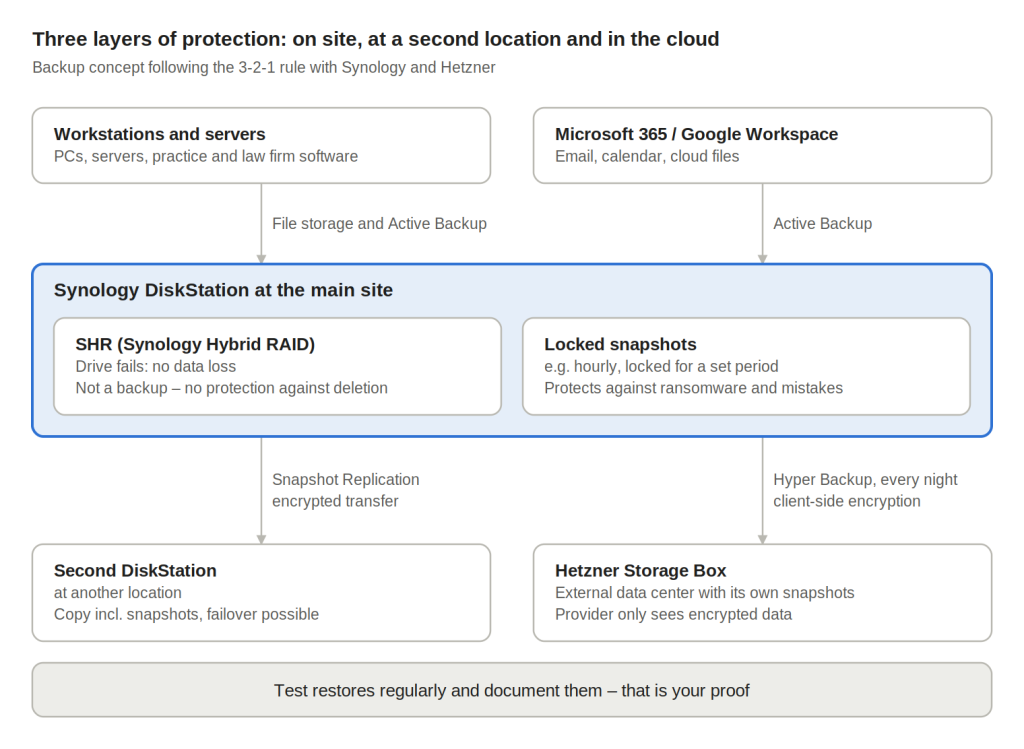
At the top are the data sources, in the middle the DiskStation as the core, and at the bottom the two off-site copies. If one layer fails, the next one takes over.
1. Synology DiskStation with SHR
All data is stored centrally on a Synology DiskStation. The hard drives run as an SHR array (Synology Hybrid RAID): if one drive fails, no data is lost. An uninterruptible power supply (UPS) adds protection against power outages.
But note: RAID is not a backup. If a file is deleted or encrypted by malware, that happens on all drives at the same time.
2. Locked snapshots against ransomware
The DiskStation regularly creates snapshots, i.e. point-in-time copies of your data – for example every hour. Deleted files can be restored in seconds. Snapshots can be locked for a set period, during which they cannot be deleted – not even by attackers with administrator rights. After an attack, you simply roll back to the state before it happened.
3. Replication to a second DiskStation
The data is automatically copied, encrypted, to a second DiskStation at another location, such as a branch office or the owner’s home. If the main device fails due to a defect, fire or theft, the second DiskStation takes over.
4. Nightly encrypted cloud backup with Hetzner
Every night, the DiskStation also backs up your data to a data center, for example to a Hetzner Storage Box. The data is encrypted before it is uploaded – the provider cannot read it. Hetzner is a German provider with data centers in the EU and offers a GDPR data processing agreement. Additional snapshots on the Hetzner side protect the backup even if the DiskStation itself is attacked.
Important: keep the encryption key in a safe place outside the DiskStation, for example in a password manager and printed out in a safe. Without it, even you will no longer be able to access your data.
5. Back up PCs, servers and Microsoft 365 too
With Synology Active Backup for Business, you can also back up workstations, servers and Microsoft 365 – at no extra licensing cost. Microsoft makes sure its services keep running, but not that you can still recover deleted data months later.
6. Test and document regularly
A backup is only as good as its restore. That’s why backup reports should be checked daily and restores tested regularly, for example every quarter. Every test is documented – in an emergency, this is your proof that you acted with due care.
Which component protects against what?
| What happens? | SHR | Snapshots | 2nd DiskStation | Cloud backup |
|---|---|---|---|---|
| Hard drive fails | yes | no | yes | yes |
| File deleted | no | yes | yes | yes |
| Ransomware attack | no | yes | yes | yes |
| Fire, water, theft | no | no | yes | yes |
Only all components together protect against all typical types of damage.
Further important protective measures
To make sure an emergency never happens in the first place, these measures belong in every business as well:
- Updates for all devices and software – outdated systems are replaced. What this currently means for Windows 10 is explained here.
- Two-factor authentication for email, Microsoft 365 and remote access.
- No direct access from the internet to the DiskStation and servers – remote access only via VPN.
- Antivirus protection on all computers.
- Trained employees, because most attacks start with a phishing email. A real-world example: Email account hacked: extortion emails from your own inbox.
- A printed emergency plan: Who do I call, what gets restored first, and who reports the incident?
Checklist: are you on the safe side?
If you can’t tick a point, it’s time to act.
- ☐ Our data is backed up at least daily.
- ☐ One backup is stored off-site and encrypted.
- ☐ One backup is protected so that attackers cannot delete it.
- ☐ The encryption key is stored safely.
- ☐ Restoring data has been tested and documented within the last three months.
- ☐ I receive regular reports on the state of our IT security.
- ☐ Updates, two-factor authentication and antivirus protection are active everywhere.
- ☐ We have a data processing agreement with our IT service provider and – for practices and law firms – a confidentiality agreement.
Conclusion: prevention costs far less than liability
Without backups, you risk not only your data but – as managing director or owner – your own money. Yet good protection is not a major project: a DiskStation with SHR, locked snapshots, a second DiskStation and an encrypted cloud backup cost far less than a single day of downtime. What matters is checking and documenting everything regularly – because in an emergency, what counts is what you can prove.
How I can help
I personally support businesses, medical practices, law firms and tax advisors in Bedburg, Bergheim and the Rhein-Erft district. I review your current backup setup, implement the right solution and take care of monitoring and testing.
Book your free initial IT consultation now – or learn more about my IT security services.
Note: This article provides a general overview of German law (as of September 2026) and does not constitute legal advice. Please clarify your personal situation with a lawyer.
Sources
- IHK Darmstadt: NIS-2 obligations for companies (in German)
- Section 30 BSIG – risk management measures (in German)
- OLG Hamm, judgment of December 1, 2003, 13 U 133/03 (in German)
- KBV: IT security in medical practices (in German)
- Section 2 BORA and Section 43e BRAO (in German)
- Synology: Snapshot Replication
- Hetzner: Synology Hyper Backup to a Storage Box
Transparency note: This article was written by me.
AI was used for language editing. I am responsible for the content.